Skip to content
UBT Technology | Knowledgebase & Support
Home   NBN   Change of Billing   Book a Support Call
  • Home
  • Mobile
  • How do I enable Data Roaming (Samsung)?

Mobile

    • How to check how much mobile data you have used.
    • How to use Samsung Members Diagnostics
    • How do I enable Data Roaming (Samsung)?

Article Categories

  • Hosted Voice
  • Mobile
  • NBN Internet
  • Streamline3

Recent Articles

  • Streamline 3 Setup Guide
  • How to check how much mobile data you have used.
  • How to use Samsung Members Diagnostics
  • How do I enable Data Roaming (Samsung)?
  • Unlock your Streamline3 device / VPN for App Setup.

How do I enable Data Roaming (Samsung)?

2 years ago
Gavin Killackey
1 minute

Telstra International Travel Guide

Optus International Travel Guide

Open the Settings app


Tap Connections
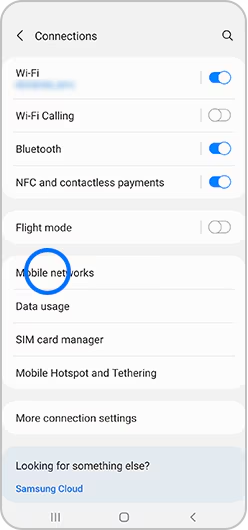

Tap Mobile Networks
Mobile networks selected within connections section of settings menu

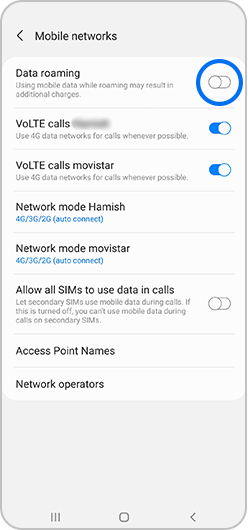
Tap the switch to activate or deactivate Data Roaming

Please note: If the Data Roaming switch is greyed out, check that Mobile data is activated. Go to Settings > Connections > Data usage > Mobile data.

Data roaming selected within Mobile networks menu

You will now be able to use mobile internet when abroad.

#data #roaming #samsung
Copyright © UBT 2023. All rights reserved.
Home Change of Lessee NBN Enterprise Ethernet Teams Calling